A05: 安全設定錯誤(Security Misconfiguration)
安全設定錯誤指的是應用程式、伺服器、資料庫或其他基礎設施的錯誤配置,導致攻擊者能夠利用系統的弱點。這可能包括未移除預設帳號、啟用不安全的 HTTP 標頭、暴露不必要的資訊等。
環境準備
Nginx Docker Image
- 首先透過 docker-desktop 設定中,開啟 WSL integration。
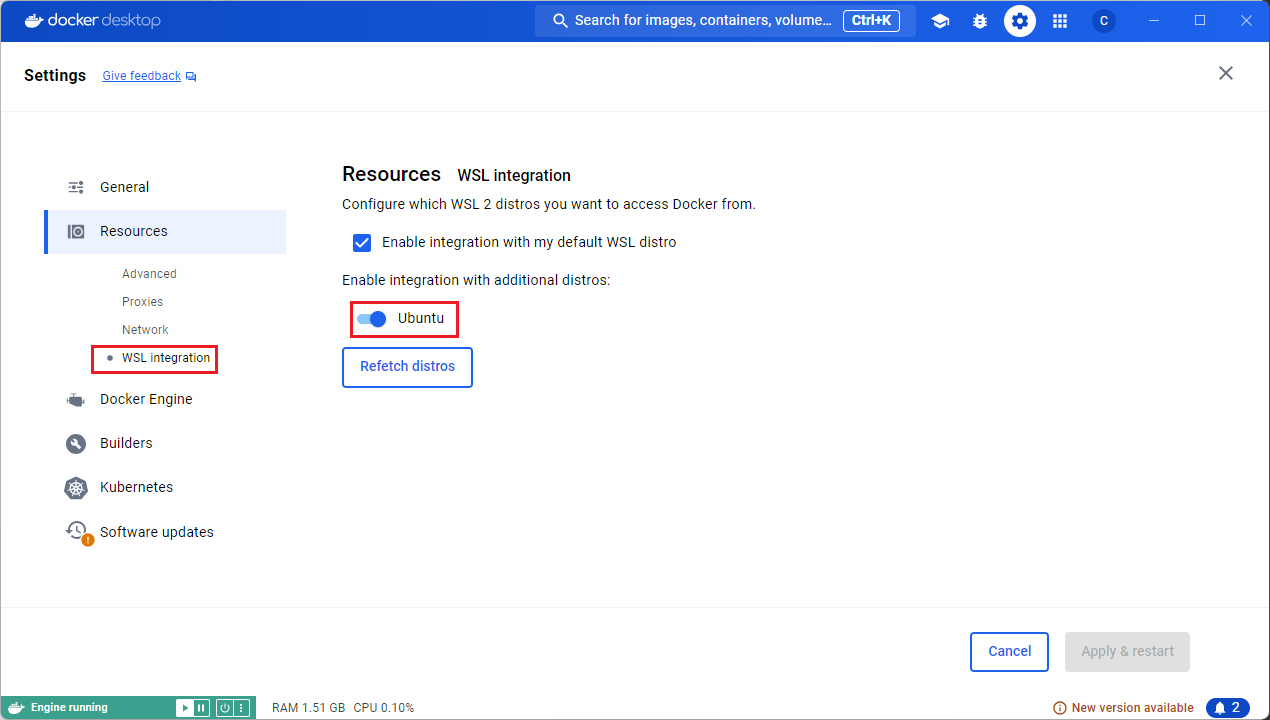
- 測試在 WSL 中可以使用 Docker。
wsl -d Ubuntu
docker --version
---

Docker version 26.1.4, build 5650f9b
- 因為我們要自訂義設定檔,所以我們先從 docker 內部將預設的設定檔讀出來。
docker run --rm --entrypoint=cat nginx /etc/nginx/nginx.conf > nginx.conf
- 透過 docker run 的指令,我們將創立一個 container,並且將設定檔掛載起來,且 Port 映射到本機的 8080port 上。
docker run --name my-custom-nginx-container -v ./nginx.conf:/etc/nginx/nginx.conf:ro -p 8080:8
0 -d nginx
- 透過指令確認可以運行。
curl http://localhost:8080
---

<title>Welcome to nginx!</title>
- 刪除 docker container 來關閉服務。
docker container rm -f my-custom-nginx-container
Nikto 安裝
sudo apt install nikto -y
nikto version
---

- Nikto v2.1.5
常見的 Nginx 安全設定錯誤
Nginx 是一個常見的 Web 伺服器,但若設定錯誤,可能導致敏感資訊洩露或讓攻擊者利用錯誤配置來入侵系統。
案例 1:開啟目錄瀏覽(Directory Listing)
❌ 漏洞描述
如果 Nginx 配置允許目錄索引(autoindex on;),攻擊者可以直接瀏覽網站的檔案夾,下載敏感資料。
❌ Nginx 配置錯誤
server {
    listen 80;
    server_name localhost;

    root /var/www/html;
    index index.html index.php;

    autoindex on;  # ❌ 錯誤!允許目錄瀏覽
}
🔍 檢測手法
攻擊者可以在瀏覽器或使用 Nikto 來測試:
nikto -h http://localhost:8080 -C all
---

+ OSVDB-3268: /test/: Directory indexing found.
+ OSVDB-3092: /test/: This might be interesting...
✅ 修補方式
關閉 autoindex:
server {
    listen 80;
    server_name localhost;

    root /var/www/html;
    index index.html index.php;

    autoindex off;  # ✅ 禁止目錄瀏覽
}
案例 2:Nginx 暴露伺服器資訊
❌ 漏洞描述
Nginx 預設會在 HTTP 響應標頭中洩露版本資訊,例如:
Server: nginx/1.18.0
🔍 檢測手法
攻擊者可以使用 Nikto 或 curl 來檢測:
curl -I http://localhost:8080
---

Server: nginx/1.27.4
nikto -h http://localhost:8080 -C all
---

+ Server: nginx/1.27.4
✅ 修補方式
在 nginx.conf 中關閉伺服器資訊:
server_tokens off;
案例 3:未設定 HTTP 安全標頭
❌ 漏洞描述
缺少 HTTP 安全標頭可能導致 XSS、點擊劫持(Clickjacking)或資料竊取。
❌ Nginx 配置錯誤
server {
    listen 80;
    server_name localhost;

    root /var/www/html;
    index index.html index.php;
}
問題:
- ❌ 未使用
X-Frame-Options,攻擊者可利用 iframe 嵌入網站進行點擊劫持。 - ❌ 未使用
Content-Security-Policy (CSP),可能導致 XSS 攻擊。
🔍 檢測手法
使用 Nikto 檢測:
nikto -h http://localhost:8080 -C all
---

+ The anti-clickjacking X-Frame-Options header is not present.
✅ 修補方式
新增安全標頭:
server {
    listen 80;
    server_name localhost;

    root /var/www/html;
    index index.html index.php;

    # 安全標頭設定
    add_header X-Frame-Options "DENY";  # 或 "SAMEORIGIN"
    add_header X-Content-Type-Options "nosniff";
    add_header Content-Security-Policy "default-src 'self';";
}
使用 Nikto 檢測:
nikto -h http://localhost:8080 -C all
---

+ Uncommon header 'x-content-type-options' found, with contents: nosniff
+ Uncommon header 'x-frame-options' found, with contents: DENY
+ Uncommon header 'content-security-policy' found, with contents: default-src 'self';
案例 4:允許 .git 目錄存取
❌ 漏洞描述
開發者常會不小心上傳 .git 目錄,攻擊者可以透過 Nikto 或手動測試下載 .git/config:
curl -s http://localhost:8080/.git/config
如果回應如下:
[core]
    repositoryformatversion = 0
    filemode = true
代表 .git 目錄可被存取,攻擊者可以嘗試下載整個 Git 倉庫。
✅ 修補方式
阻止 .git 目錄存取:
server {
    listen 80;
    server_name localhost;

    root /var/www/html;
    index index.html index.php;

    # 禁止存取 .git 目錄
    location ~ /\.git {
        deny all;
    }
}
案例 5:允許 HTTP 而非 HTTPS
❌ 漏洞描述
如果 Nginx 只開啟 HTTP,則使用者的登入憑證與 Cookie 可能會被竊聽。
✅ 修補方式
設定 HTTPS:
server {
    listen 80;
    server_name localhost;
    return 301 https://$host$request_uri;  # ✅ 強制轉向 HTTPS
}

server {
    listen 443 ssl;
    server_name localhost;

    ssl_certificate /etc/nginx/ssl/example.crt;
    ssl_certificate_key /etc/nginx/ssl/example.key;
}
案例 6:未設定 ETag 標頭
❌ 漏洞描述
未使用 ETag 標頭可能會導致伺服器在處理條件請求時泄漏敏感信息或內部結構(如 inode、文件的變更狀態等),這可能會被攻擊者用來進行各種攻擊(例如 DoS 攻擊或篡改緩存的內容)。
❌ Nginx 配置錯誤
server {
    listen 80;
    server_name localhost;

    root /var/www/html;
    index index.html index.php;
}
問題:
- ❌ 未使用
ETag標頭,這可能會導致伺服器在處理緩存請求時暴露 inode 信息或文件的狀態。
🔍 檢測手法
使用 Nikto 檢測:
nikto -h http://localhost:8080 -C all
---

+ Server leaks inodes via ETags, header found with file /, fields: 0x67a34638 0x267
✅ 修補方式
為了防止 ETag 泄漏敏感信息,可以在 Nginx 配置中禁用 ETag 標頭。這樣可以阻止伺服器向客戶端傳遞與文件內容相關的內部信息。
server {
    listen 80;
    server_name localhost;

    root /var/www/html;
    index index.html index.php;

    # 禁用 ETag 標頭
    etag off;
}
使用 Nikto 重新檢測就不會出現。
總結
Nginx 完整設定
user  nginx;
worker_processes  auto;

error_log  /var/log/nginx/error.log notice;
pid        /var/run/nginx.pid;


events {
    worker_connections  1024;
}


http {
    include       /etc/nginx/mime.types;
    default_type  application/octet-stream;

    log_format  main  '$remote_addr - $remote_user [$time_local] "$request" '
                      '$status $body_bytes_sent "$http_referer" '
                      '"$http_user_agent" "$http_x_forwarded_for"';

    access_log  /var/log/nginx/access.log  main;

    server_tokens off;
    sendfile        on;
    #tcp_nopush     on;

    keepalive_timeout  65;

    #gzip  on;

    etag off;
    add_header X-Frame-Options "DENY";  # 或 "SAMEORIGIN"
    add_header X-Content-Type-Options "nosniff";
    add_header Content-Security-Policy "default-src 'self';";

    server {
        listen 80;
        server_name localhost;

        root /usr/share/nginx/html;
        index index.html;

        location ~ /\.git {
            deny all;
        }
    }

    include /etc/nginx/conf.d/*.conf;
}
Nikto 檢測報告
nikto -h http://localhost:8080 -C all
---

- Nikto v2.1.5
---------------------------------------------------------------------------
+ Target IP:          127.0.0.1
+ Target Hostname:    localhost
+ Target Port:        8080
+ Start Time:         2025-02-14 01:29:19 (GMT8)
---------------------------------------------------------------------------
+ Server: nginx
+ Uncommon header 'x-frame-options' found, with contents: DENY
+ Uncommon header 'content-security-policy' found, with contents: default-src 'self';
+ Uncommon header 'x-content-type-options' found, with contents: nosniff
+ 6544 items checked: 0 error(s) and 3 item(s) reported on remote host
+ End Time:           2025-02-14 01:29:35 (GMT8) (16 seconds)
---------------------------------------------------------------------------
+ 1 host(s) tested
| 錯誤配置 | Nginx 配置錯誤 | 修復方式 |
|---|---|---|
| 開啟目錄索引 | autoindex on; | autoindex off; |
| 暴露 Nginx 版本資訊 | server_tokens on; | server_tokens off; |
| 缺少 HTTP 安全標頭 | 無 add_header 設定 | 加入 add_header |
允許存取 .git 目錄 | 無 .git 限制 | deny all; |
| 未強制 HTTPS | 只開 HTTP (listen 80;) | 強制轉 HTTPS (return 301 https://) |
| 未設定 ETag 標頭 | 無 etag 設定 | etag off; |
🛠️ 這些 錯誤設定 都可以用 Nikto 來自動化掃描,建議開發者 定期使用 Nikto 來檢測伺服器設定!